
Analysis – Data Source Status
The Data Source Status screen provides an overview of all data collected for the property and shows what will, and will not, appear in the final report. It acts as a checkpoint before report generation, helping you confirm completeness and relevance.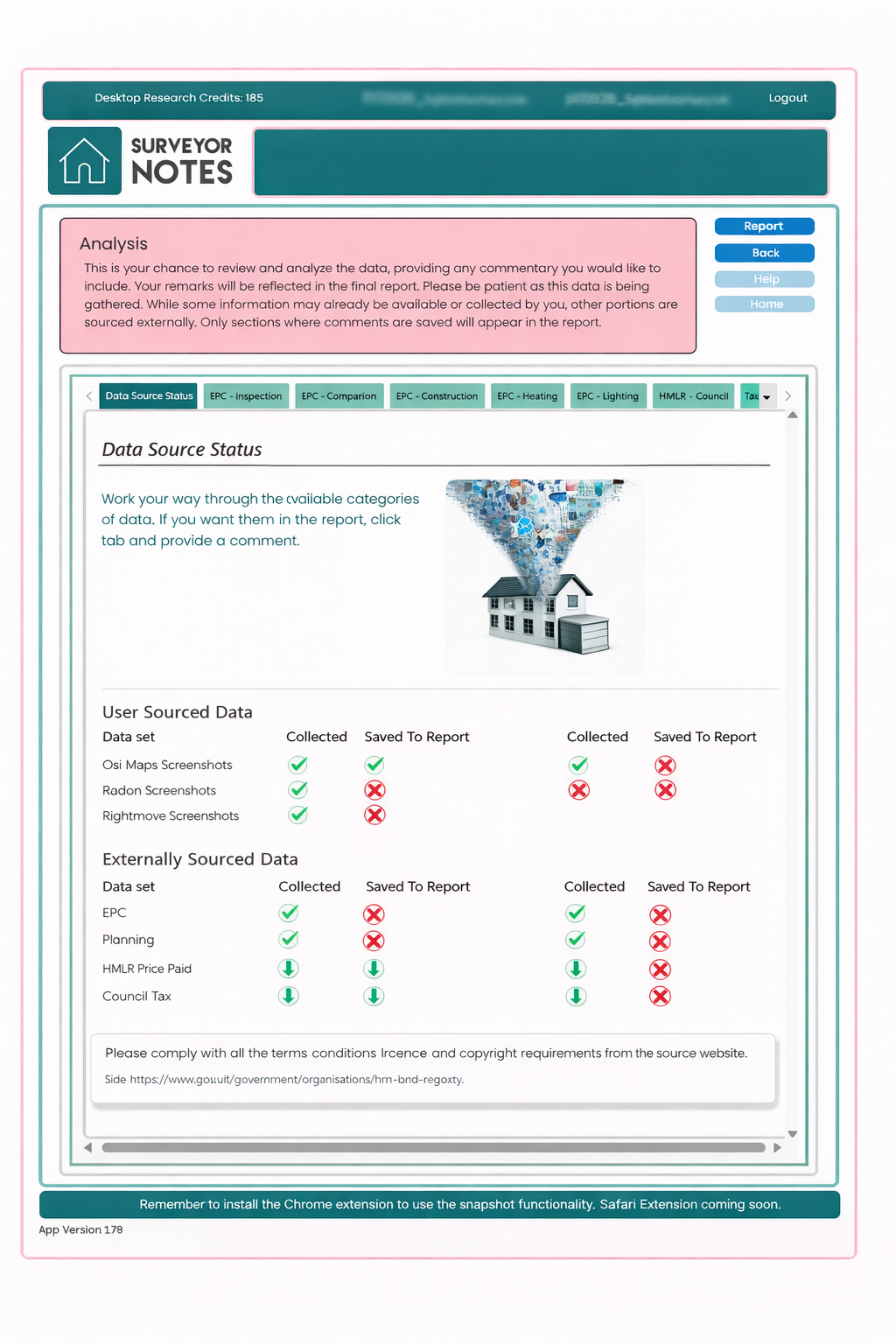
Purpose of this screen
This screen allows you to:
-
see which data sources have been collected,
-
identify which sources include saved commentary,
-
confirm which sections will be included in the final report.
Only data sources that have saved commentary will be included in the report.
Understanding the status indicators
Each data source is shown with clear status indicators:
-
Collected
Indicates that data, screenshots, or records have been gathered for this section. -
Saved to Report
Indicates that commentary has been added and saved, meaning the section will appear in the final report.
A green tick shows completion, while a red cross indicates that the step has not yet been completed.
User-sourced vs externally sourced data
The screen separates data into two categories:
User-sourced data
This includes data you have actively captured, such as:
-
mapping and screenshot evidence,
-
Rightmove screenshots,
-
radon or environmental screenshots.
These sections require your commentary to be included in the report.
Externally sourced data
This includes data retrieved automatically from external sources, such as:
-
EPC information,
-
planning data,
-
HMLR price paid records,
-
council tax data.
Even though this data may already be available, it will only appear in the report if you add and save commentary.
How to use this screen effectively
-
Review each data source and its status.
-
Click into any section that shows data collected but not saved to the report.
-
Add professional commentary where appropriate.
-
Save the commentary to include that section in the report.
This ensures the report only contains relevant, reviewed, and defensible content.
Important notes
-
This screen does not itself add content to the report.
-
It provides visibility and control over report inclusion.
-
AI-generated data and summaries should always be reviewed before saving.
Professional responsibility
Surveyor Notes assists with data collection and summarisation, but:
-
final selection of content,
-
interpretation of data,
-
and responsibility for conclusions
remain entirely with the surveyor.