
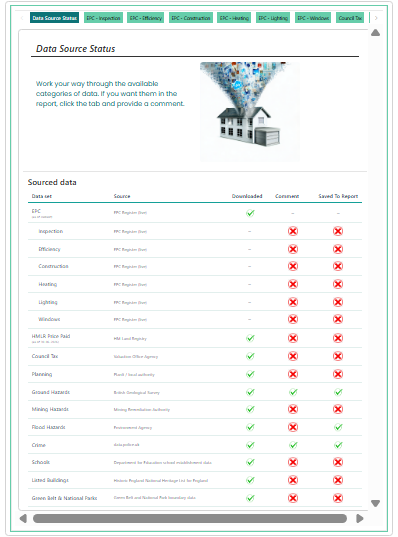
This screen is the central review area for the desktop research workflow. It allows you to review the available datasets, inspect the information collected for the property and add the commentary you want to include in the final report.
Purpose of this screen
The Analysis screen brings together the research categories available for the property, including:
- Data Source Status
- EPC information
- Inspection
- Certainty
- Construction
- Heating
- Lighting
- Windows
- Council Tax
- Planning
- Ground Hazards
- Mining Hazards
- Flood Hazards
- Crime
- Schools
- Listed Buildings
- Green Belt & National Parks
Use the tabs to move between categories and review the information before deciding what should be saved to the report.
Data Source Status
The Data Source Status tab provides an overview of the research workflow for each dataset.
It shows whether a dataset has been:
- Downloaded or retrieved
- Converted into usable content
- Saved to the report
This helps you identify which sources are ready for review and which categories still need commentary or a report decision.
How to use this screen
- Start with Data Source Status to review the availability of each dataset.
- Select a category tab to inspect the available information.
- Review the data and add, amend or remove commentary as appropriate.
- Where the dataset has not yet been converted, use the relevant action to prepare it for report use.
- Save the content you want to include in the report.
- Continue through each relevant category before moving to the final report stage.
Understanding the status indicators
A completed download indicates that source data has been retrieved for the property. A completed conversion indicates that the information has been prepared for review or report use. A completed saved-to-report status indicates that content from that category has been included in the report.
A missing or incomplete status does not necessarily mean that no relevant information exists. It may indicate that the source has not yet been processed, no commentary has been entered, or the category does not apply to the property.
Important distinction
This screen is for reviewing and preparing information. It does not automatically add every available dataset to the final report.
You remain responsible for deciding which information is relevant, checking the wording and ensuring the final commentary is accurate, balanced and appropriate to the inspection and property.
Why this matters
The Analysis screen helps ensure that the report is based on reviewed, relevant and clearly presented information rather than simply reproducing all available data. It provides a structured way to identify gaps, add professional context and build a defensible final report.