
Start/Search – Property Research Files
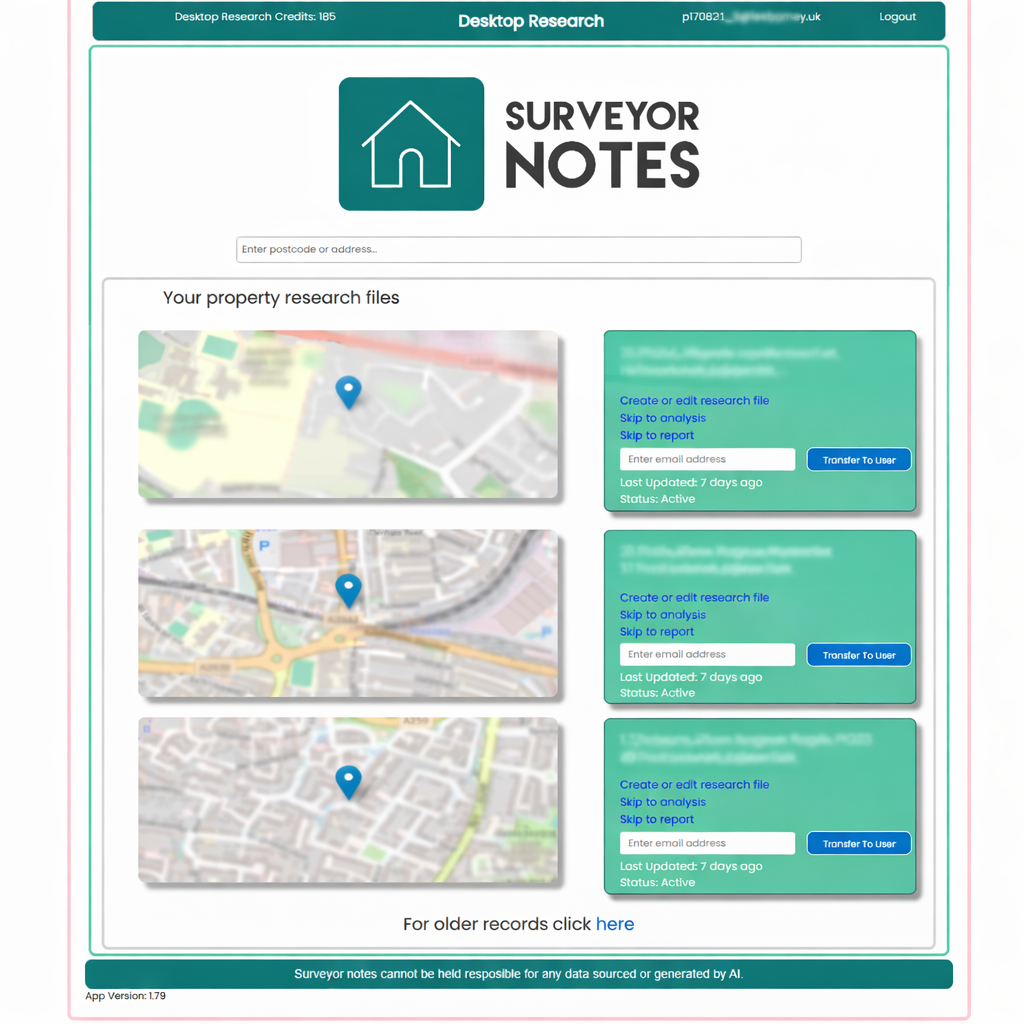
This screen is the starting point for Desktop Research in Surveyor Notes. It allows you to search for properties, create new research files, and access existing research records.
Purpose of this screen
The Search screen is used to:
-
locate an existing property research file,
-
create a new Desktop Research record,
-
or quickly jump to analysis or report generation for an active property.
Each property research file represents a single address or property and contains all captured data, screenshots, commentary, and reports associated with that property.
Searching for a property
Use the search bar at the top of the screen to:
-
enter a postcode or full address, or
-
quickly locate an existing research file.
Matching properties and recent research files will appear below the search bar.
Your property research files
The list displays your active and recent research files, each shown with:
-
a location preview map,
-
the property address,
-
last updated date,
-
current status.
From each property card, you can:
-
Create or edit research file – continue gathering data and screenshots,
-
Skip to analysis – go directly to the commentary and review stage,
-
Skip to report – open the report generation screen,
-
Transfer to user – assign the research file to another user by email (for example, a colleague or administrator).
Creating a new research file
If no existing record matches your search:
-
Enter the postcode or address.
-
Create a new research file.
-
The system will guide you into the Desktop Research workflow.
Each new file is automatically tracked and saved as you progress.
Older records
A link is provided to access older research records that are not shown in the main list, helping keep the screen focused and easy to navigate.
Important notes
-
Each research file is independent and relates to one property only.
-
All data, screenshots, and commentary are saved against the relevant property file.
-
Research files remain active until completed or transferred.
-
Surveyor Notes provides tools to assist with research, but professional responsibility remains with the surveyor.